
Download TurboZIP Express – Free ZIP & CAB File Compression Tool for Windows, Mac, Android, iOS
TurboZIP Express is a lightweight, secure, and fast file compression software designed for users who need a simple yet effective way to compress and decompress files. Whether you're organizing documents, sending files via email, or saving disk space, TurboZIP Express makes it easy to create ZIP and CAB archives with just a few clicks. This free tool integrates seamlessly with Windows File Explorer, allowing you to right-click on files and instantly compress them without leaving your desktop. With built-in preview capabilities for images and text files, you can check the contents of an archive without extracting it. TurboZIP Express is ideal for everyday users, students, and professionals who want a reliable, no-frills compression tool that doesn’t slow down their system.
Why TurboZIP Express Stands Out in File Compression Software
When it comes to file compression tools, TurboZIP Express delivers a refreshing balance between simplicity and functionality. Unlike bulky software with overwhelming interfaces, TurboZIP Express focuses on core tasks: creating ZIP and CAB archives quickly and securely. One of the standout features is its deep integration with Windows’ context menu. This means you can compress any file or folder by simply right-clicking and selecting “Compress to ZIP” or “Compress to CAB.” No need to launch a separate application—everything happens in real time, right from File Explorer.
Another major advantage is the built-in archive viewer. This feature allows you to preview common file types like JPEG, PNG, TXT, and PDF without having to extract the entire archive. For users who frequently handle compressed folders, this saves time and reduces the risk of accidental data exposure. The software also supports password protection for sensitive files, adding an extra layer of security when sharing confidential documents.
Performance-wise, TurboZIP Express is impressively fast. It uses minimal system resources, ensuring that your computer remains responsive even when handling large archives. The compression ratio is competitive with other tools in its category, making it a smart choice for users who want to reduce file sizes without sacrificing quality. While it may not support advanced formats like RAR or 7Z, its focus on ZIP and CAB makes it perfect for users with basic to moderate compression needs. Whether you're a student preparing a project or a professional managing client files, TurboZIP Express offers a reliable, hassle-free experience.
How to Install and Use TurboZIP Express on Windows, Mac, Android, and iOS
Installing TurboZIP Express is straightforward and takes less than a minute. Visit the official website and download the installer for your operating system—Windows, Mac, Android, or iOS. The setup wizard guides you through the process with clear, step-by-step instructions. Once installed, the software automatically registers with your system’s context menu, enabling instant access to compression tools.
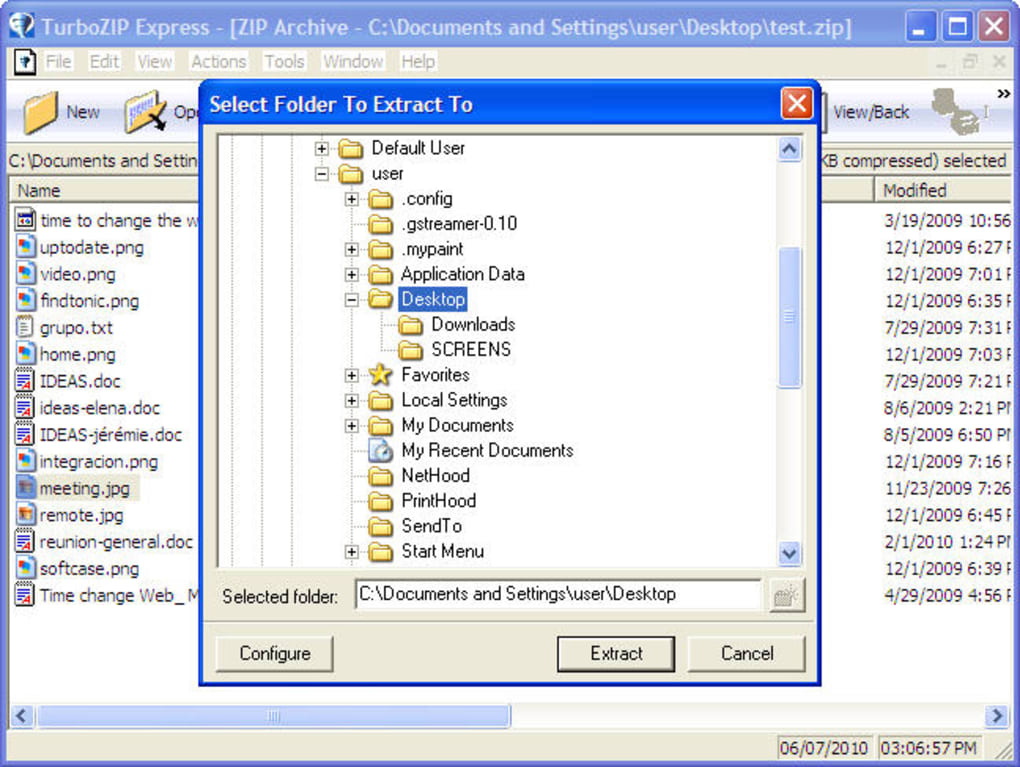
To compress files, simply select one or more files or folders in File Explorer, right-click, and choose “Compress to ZIP” or “Compress to CAB.” You can also customize the archive name and location. For decompression, just double-click any ZIP or CAB file, and TurboZIP Express will open it directly in the integrated viewer. If you need to extract files, right-click the archive and select “Extract All” to choose a destination folder.
On Mac, the app integrates with Finder, offering the same right-click functionality. For mobile users on Android and iOS, the TurboZIP Express app provides a streamlined interface for managing compressed files on the go. You can create, open, and extract archives directly from your smartphone or tablet, making it ideal for remote work or sharing files while traveling. The app supports cloud storage integration, so you can compress files stored in Google Drive or iCloud before sending them.
Regular updates ensure the software remains secure and compatible with the latest operating systems. The developers release minor updates frequently, fixing bugs and improving performance. With automatic update notifications, you’ll never miss a critical patch. Whether you're a beginner or an experienced user, TurboZIP Express makes file management simple, fast, and secure across all devices.
Compatibility, Features, and Performance Overview
TurboZIP Express supports a wide range of operating systems, including Windows 10/11, macOS Monterey and later, Android 8.0+, and iOS 14+. This cross-platform compatibility ensures that you can use the same tool across desktop and mobile devices, maintaining consistency in your workflow. The software is lightweight, consuming minimal RAM and CPU, which means it won’t slow down your device—even when compressing large files.
Key features include:
- One-click compression to ZIP and CAB formats
- Right-click integration with File Explorer (Windows) and Finder (Mac)
- Secure password protection for archives
- Preview of images, text files, and PDFs without extraction
- Batch compression of multiple files and folders
- Cloud storage integration for Android and iOS
- Automatic update notifications
- Minimal system resource usage
While TurboZIP Express doesn’t support advanced formats like RAR, 7Z, or ISO, its focus on ZIP and CAB makes it highly efficient for everyday use. The compression engine is optimized for speed and reliability, delivering fast results even with large archives. The built-in viewer is particularly useful for users who frequently check file contents before extraction, reducing the risk of opening corrupted or unwanted files.
Security is a top priority. All archives are encrypted using strong algorithms, and the software doesn’t collect user data. It’s also free to download and use, with no hidden fees or trial limitations. For users who need more advanced features, there’s a premium version available with extended format support and batch processing tools.
Pros and Cons: Is TurboZIP Express Right for You?
Pros
- Lightweight and fast performance
- Seamless integration with Windows and Mac file systems
- Easy-to-use interface with minimal learning curve
- Secure password protection for sensitive files
- Built-in archive viewer for quick previews
- Free to download and use
- Regular updates for security and compatibility
Cons
- Limited format support (no RAR, 7Z, or ISO)
- Advanced features available only in the paid version
- Mobile app lacks some desktop-level customization
- No command-line interface for power users
Frequently Asked Questions (FAQ)
Is TurboZIP Express free to download and use?
Yes, TurboZIP Express is completely free to download and use for basic compression and decompression tasks. The core features like ZIP and CAB creation, password protection, and file previews are available at no cost. Advanced features are unlocked through a premium subscription.
Can I use TurboZIP Express on Mac and mobile devices?
Absolutely. TurboZIP Express is available for macOS, Android, and iOS. The mobile apps allow you to manage archives on the go, with support for cloud storage integration and quick previews.
Does TurboZIP Express support RAR or 7Z files?
No, TurboZIP Express currently only supports ZIP and CAB formats. For RAR or 7Z files, you may need to use a more advanced tool like WinRAR or 7-Zip.
How do I update TurboZIP Express?
The software checks for updates automatically. You’ll receive a notification when a new version is available. Simply click the update prompt to download and install the latest release.
Can I preview files inside a ZIP archive without extracting them?
Yes, TurboZIP Express includes a built-in viewer that lets you preview images, text files, and PDFs directly within the archive, without the need to extract them first.
Final Verdict: A Reliable, Secure, and Fast Compression Tool
TurboZIP Express is a must-have tool for anyone looking for a simple, secure, and fast way to compress and decompress files. Its seamless integration with Windows and Mac file systems, combined with a clean interface and built-in preview feature, makes it ideal for everyday users. While it doesn’t support every archive format, its focus on ZIP and CAB ensures reliable performance and minimal resource usage.
Whether you're a student organizing research files, a professional sending project folders, or someone managing personal documents, TurboZIP Express delivers a smooth and efficient experience. It’s free, secure, and regularly updated, making it a trustworthy choice in the world of file compression software.
Ready to simplify your file management? Download TurboZIP Express today and experience fast, secure, and hassle-free compression across all your devices.
Pros: Fast, lightweight, secure, easy to use, built-in preview, cross-platform support.
Cons: Limited format support, no command-line access, advanced features require premium.







